Sort Score
Result 10 results
Languages All
Labels All
Results 81 - 90 of 8,368 for

3d mesh

(0.42 sec)
  1. Aspose.3D Boolean operations on meshes | produc...

    Learn how to do Boolean operation on Meshes...3D Tutorial Boolean Operation on Meshes ⯬ Previous...write code here to use Aspose.3D and run the code in browser to...

    products.aspose.com/3d/tutorial/boolean-operati...
  2. Concatenate Quaternions and apply on 3D entitie...

    Aspose.3d for Python via .NET allows developers to combine two rotation transformation into one represented in a quaternion....and apply on 3D entities Contents [ Hide ] Aspose.3D for Python...to represent an orientation in 3D space. The concat method exposed...

    docs.aspose.com/3d/python-net/concatenate-quate...
  3. Aspose.3D Get geometric transformations | produ...

    Learn how to get geometric transformations...3D Tutorial Get Geometric Transformations ⯬ Previous...write code here to use Aspose.3D and run the code in browser to...

    products.aspose.com/3d/tutorial/get-geometric-t...
  4. Aspose.3D Get geometric scaling and rotation | ...

    Learn how to get geometric scaling and rotation...3D Tutorial Get Geometric Scaling Rotation ⯬...write code here to use Aspose.3D and run the code in browser to...

    products.aspose.com/3d/tutorial/get-geometric-s...
  5. Add Animation Property and Setup Target Camera ...

    Aspose.3d for Java supports rendering animated scene. This article explains prerequisites to move an object....Property and Setup Target Camera in 3D document Contents [ Hide ] Add...Animation property in 3D document Aspose.3D for Java supports rendering...

    docs.aspose.com/3d/java/add-animation-property-...
  6. Add Animation Property and Setup Target Camera ...

    In Aspose.3d, object animation is actually key-frame animation that animates on properties. To animate properties, you need a CurveMapping instance which maps components of a property to different curves, for example, a Vector3 property can have 3 components X/Y/Z, which will set up three channels in CurveMapping, every channel can have a set of Curves....Property and Setup Target Camera in 3D document Contents [ Hide ] Add...Animation property in 3D document Aspose.3D for Python via .NET...

    docs.aspose.com/3d/python-net/add-animation-pro...
  7. add-node-hierarchy-and-share-geometric-data-of-...

    nonpremultipled deflate 459 8 8 8 8 PixelInterleaved 0.26462027 width=399, height=459, bitDepth=8, colorType=RGBAlpha, compressionMethod=deflate, filterMethod=adaptive, interlaceMethod=none RGB 8 8......nonpremultipled deflate 459 8 8 8 8 PixelInterleaved 0.26462027 width=399, height=459, bitDepth=8, colorType=RGBAlpha, compressionMethod=deflate, filterMethod=adaptive, interlaceMethod=none RGB 8 8...
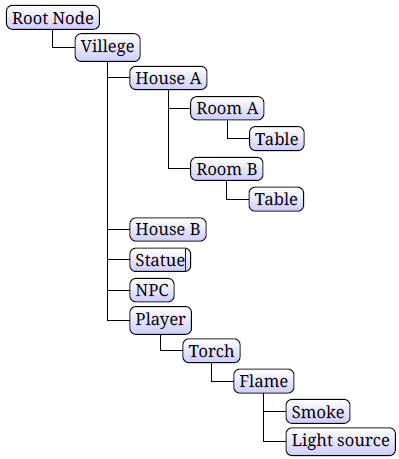
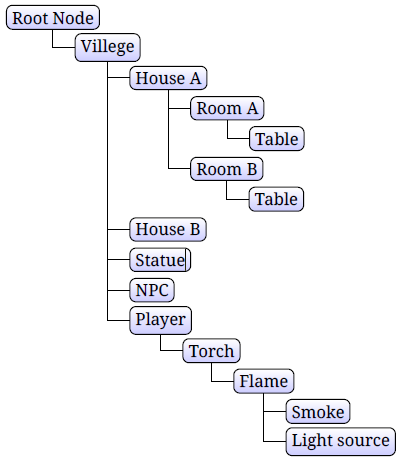
    docs.aspose.com/3d/fr/python-net/add-node-hiera...
  8. add-node-hierarchy-and-share-geometric-data-of-...

    nonpremultipled deflate 459 8 8 8 8 PixelInterleaved 0.26462027 width=399, height=459, bitDepth=8, colorType=RGBAlpha, compressionMethod=deflate, filterMethod=adaptive, interlaceMethod=none RGB 8 8......nonpremultipled deflate 459 8 8 8 8 PixelInterleaved 0.26462027 width=399, height=459, bitDepth=8, colorType=RGBAlpha, compressionMethod=deflate, filterMethod=adaptive, interlaceMethod=none RGB 8 8...
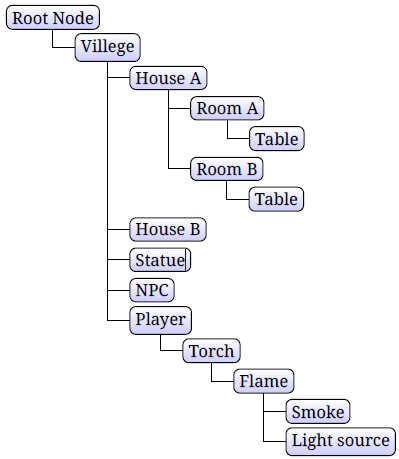
    docs.aspose.com/3d/fr/net/add-node-hierarchy-an...
  9. add-node-hierarchy-and-share-geometric-data-of-...

    nonpremultipled deflate 459 8 8 8 8 PixelInterleaved 0.26462027 width=399, height=459, bitDepth=8, colorType=RGBAlpha, compressionMethod=deflate, filterMethod=adaptive, interlaceMethod=none RGB 8 8......nonpremultipled deflate 459 8 8 8 8 PixelInterleaved 0.26462027 width=399, height=459, bitDepth=8, colorType=RGBAlpha, compressionMethod=deflate, filterMethod=adaptive, interlaceMethod=none RGB 8 8...

    docs.aspose.com/3d/it/net/add-node-hierarchy-an...
  10. Aspose.3D Transform Nodes using a transformatio...

    Learn how to transform Nodes using a transformation matrix...3D Tutorial Transform Nodes Transformation Matrix...write code here to use Aspose.3D and run the code in browser to...

    products.aspose.com/3d/tutorial/transform-nodes...